Table of contents
Back in version 5.8 I said we were going to build a proper template library inside Client Portal, so you wouldn't have to download a file from our website and import it by hand. It's now been released.
From version 5.10+ creating a portal happens on a new screen, with your own templates and a gallery of ready-made ones both sitting on it.
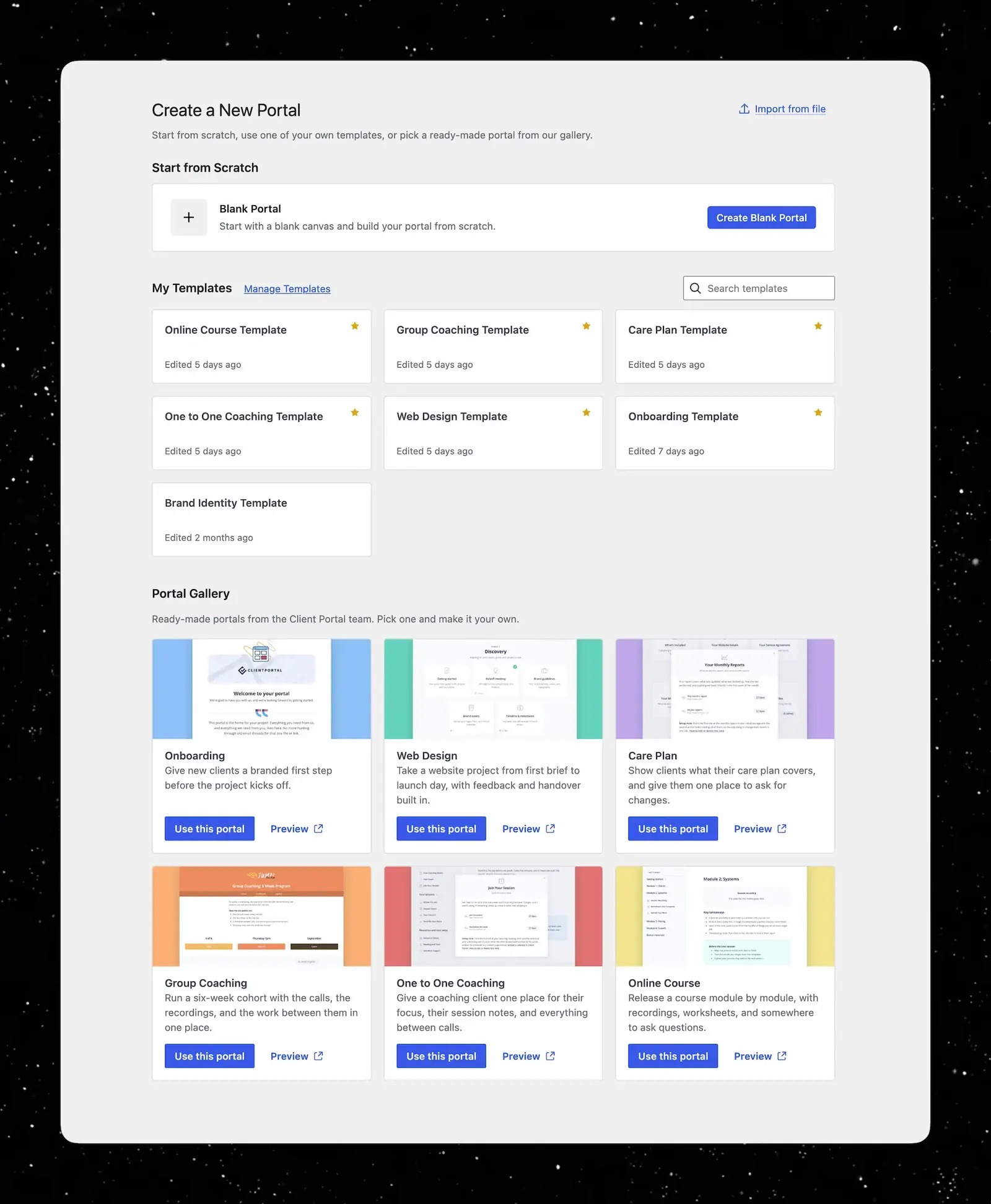
New ways to create portals faster than ever
Now we have three ways to start a portal, all in one place.
✏️ Start from scratch is unchanged. Blank portal, build it however you like.
⭐️ My templates shows the templates you've made from your own portals, with the date you last edited each one and an option to favorite templates to have them appear at the top.
🖼️ Portal gallery showcases are pre-made templates that you can import in one click.
Check out this video walkthrough to see how it works:
All about the portal gallery
These are finished portals we've built (not starting points). Phases, modules, and copy already written, so an imported one is ready to send to a client or ready for you to edit into whatever you need.
Each has a preview link that opens the portal in a new tab, exactly as a client would see it. Have a look to see if this is what you need, and then import it in one click.
There are six in the gallery to start with.
| Template | Who it's for |
|---|---|
| Onboarding | Everything you need to onboard a new client before work starts. |
| Care plan | Ongoing site care, in one place. Plan details, this month's report, and small changes on request. |
| Web design | A full website build, from discovery through to launch. |
| Group coaching | One portal for a whole cohort. Weekly calls, recordings the next day, and a worksheet between each one. |
| One-to-one coaching | A single client's coaching, in one place. Weekly focus, session notes, and anything they send you before a call. |
| Online Course | Release a course module by module. Recordings, worksheets, and a place for students to hand in work. |
Related reading
The onboarding template is built the way we'd recommend building one, which is as a separate portal rather than a phase inside a project.
Why a client onboarding portal is worth building on its own →
Want a template that isn't in there? Email us and tell me what you'd use. I'm building them in the order people ask for them, so it genuinely counts as a vote.
Other fixes and improvements
-
New notifications:
- Clients will now be notified when you upload a new file.
- You can set a custom notification to go out when you update a content page.
- Custom module icons: upload your own icon image for any module in the block editor
- A banner in the editor reminds you when you are editing a template rather than a portal, with a link explaining how templates and syncing work
- Client Uploads modules are no longer shown on public portals, where nobody can upload
- Text placed below an image slider now has proper spacing in the popup
- The Users screen loads faster on sites with many users
- Fixed the Register block's portal and template dropdowns hiding items beyond the first 10
- Fixed deleting a WordPress user leaving a ghost client on their portals, which could hide other clients in the editor and affect their login redirect
- Fixed bundled icons occasionally interfering with other scripts on the page
What's next for Client Portal
We're carrying on with the same job, which is making Client Portal easier to use as you accumulate more portals and more clients. Three things in particular.
- More templates. The gallery is the sort of thing that gets better the longer it exists. We'll be consistently adding more and more templates we'll be consistently adding more and more templates
- Backend organization. Portals, content pages, and templates all live in lists that work fine at ten items and less well at a hundred. That needs sorting, and it's the next substantial piece of work.
- A migration tool for classic editor portals. If you've been with us a long time, you may still have portals built in the classic editor. We're building a tool to move them across to the block editor properly. If you bought within the last year or so this won't apply to you, but for our longest-standing customers it's overdue.
You can keep an eye on what's coming, and add your own requests, via the roadmap.
Not using Client Portal yet? Have a look at Client Portal and see what it's all about.
Already a customer? Head to your WordPress dashboard and update.