Table of contents
Client Portal version v.10 has been released! Today's update has been consistently requested from the very beginning and, despite it not being the sexiest update, we think it's going to be really useful.
Custom slugs: All you need to know
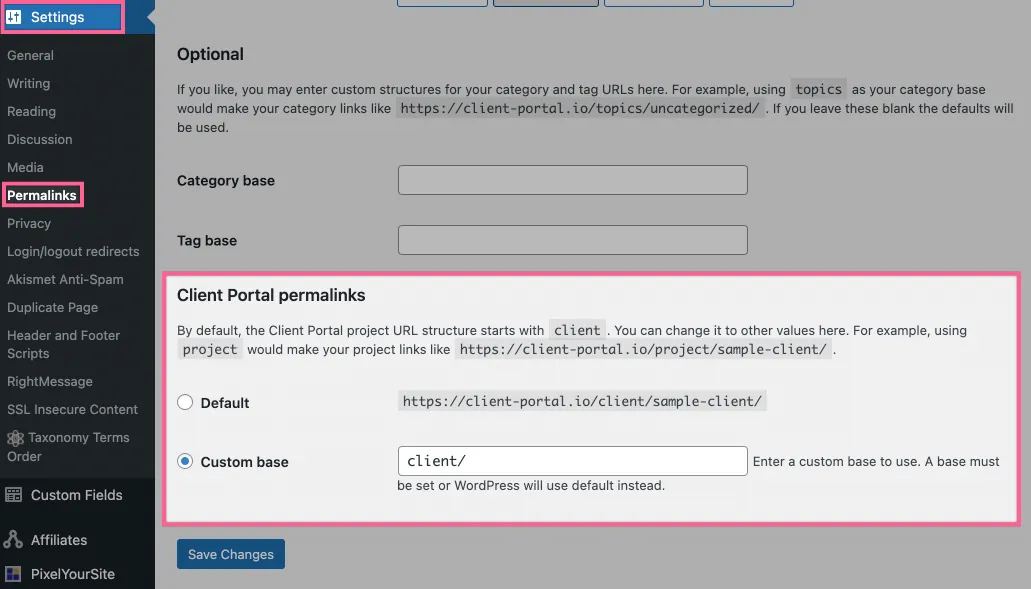
Now in Client Portal you can have the option to change the slug to whatever you like. Right now, all portals are set to yourdomain.com/client/portal-name but we know that for many of you, the term "Client" doesn't really fit with your business model.
So now you can change this to anything you like. Here's how:
- From your WordPress dashboard, navigate to Settings -> Permalinks.
- Scroll down to Client Portal Permalinks.
- Change your permalink to anything you like!
What other changes have been made to Client Portal recently?
We're constantly releasing new fixes and smaller features for Client Portal. We won't list them all here but you can check out our changelog to see everything that's been happening.
Some of the updates include:
- Added layout settings for content pages to hide the sidebar and/or increase the container width.
- Added a new notification type: Client Uploaded. The administration email can receive a notification email when files updated in Client Uploads modules.
- Added a "Send Test Notification" feature.
- Added the Client Portal icon to admin menu.
- Added a quick link to the icon cheatsheet to the portals.
- Added Bulgarian and formal German translation.
What's next for Client Portal?
The next update is going to make a lot of you happy – we constantly hear about how Client Portal is almost perfect, it's just missing this one crucial thing:
*drumroll*
🎉 Coming July 2021: Automatic Portal Creation
That's right, we are gearing up to release the ability for clients to self-register for portals. This will be a game-changer for those of you who have lots of clients with similar needs and find setting up individual portals a bit of a pain.
We are still in the research phase of the project right now, so I can't share too much about the specifics on how it will work yet, but keep your eyes peeled this summer for the update.
That's it from us! We hope you enjoy this new update and please don't hesitate to give us your feedback on how we can improve it or any other features you'd like to see in a future release.